01 · Mac App · EtherBar
Your Ethernet connection, in the menu bar.
Your Mac gives Wi-Fi a menu bar icon. Ethernet gets nothing. EtherBar adds it.
Coming soon to the Mac App Store
Free · No account · macOS 14 and later
Support & FAQ →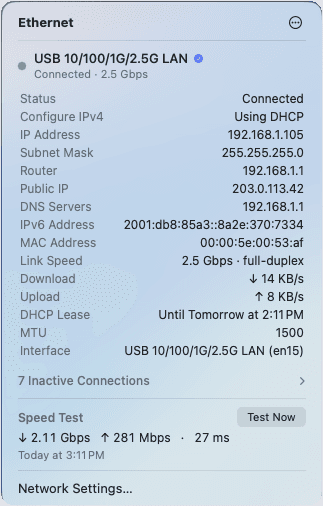
02 · What it answers
One click, instead of a trip to Network settings.
Am I connected?
The icon in your menu bar. Filled means yes.
Is the right thing connected?
The dock or the cable. Whichever is carrying traffic is marked.
How fast is the link?
The speed it negotiated. A 2.5 Gb adapter sitting at 100 Mbps shows up immediately.
What is my IP?
Local and public, both in the panel. Right-click to copy.
Is it my connection or the site?
Run a speed test from the menu bar.
03 · What it does
Everything in one panel.
Status at a glance
Filled icon means connected. Hollow means the cable is out.
Real link speed
What it actually negotiated, not what the adapter claims. Full or half duplex.
Every detail
IP, subnet, router, DNS, IPv6, MAC, MTU, DHCP lease. Right-click to copy.
Live throughput
Up and down, every second. Put it next to the icon if you want it always on.
All your adapters
Built-in, USB, docks, iPhone. Unplugged ones collapse into one row.
Speed test built in
On demand, or on a schedule. No website, no ads.
No-internet warning
Link up but nothing loading. EtherBar says so instead of showing green.
Cable trouble
Errors and drops surface when they start climbing. Usually the cable.
04 · Speed test
No website required.
The same test macOS already ships. Down, up, and latency in about twenty seconds.
On demand
A button in the panel, or right-click the icon.
Or on a schedule
Daily or weekly, at an hour you pick. It flags results that come back slower than usual.
Never mid-call
Scheduled tests wait until the link is idle.
05 · Privacy
EtherBar collects nothing.
No account, no analytics, no tracking.
Three optional checks
Reachability, public IP, and the speed test. Nothing personal in any of them.
All switchable
Turn them off and EtherBar makes no network requests at all.
Read-only
It reports on your network. It never changes it.
06 · Price
Free.
Every feature. No subscription, no in-app purchases, nothing to unlock later.
Included
- Menu bar status icon
- Live download and upload
- IP, DNS, router, IPv6, MAC
- Link speed, duplex, MTU
- DHCP lease
- Every wired adapter
- Internet and public IP checks
- Speed test, manual or scheduled
- Errors and drops
- Launch at login